UI/UX
by OneZeroEight
Dec 21, 2024
3-4 min read
Consistency and scalability are everything when it comes to building digital products, right? Think about it—whether you’re designing a sleek website, a user-friendly mobile app, or any digital interface, you want your designs to be clean, scalable, and easy to maintain. But how do you achieve that?
You might be wondering, “Wait, atomic design? What’s that all about?” Don’t worry! We’re about to break it down in the simplest, most interactive way possible so you can walk away with a clear understanding of atomic design principles. Let’s dive in!
Alright, let’s get interactive here! Imagine you’re building a LEGO masterpiece (yes, we’re getting nostalgic!). Would you start with a fully built-castle? Nope! You’d start with small blocks, piece by piece, right? That’s exactly how the Atomic Design System works—small pieces come together to form bigger, functional designs. Atomic design creates intuitive interfaces based on human-computer interaction principles.
Learn more in our blog,
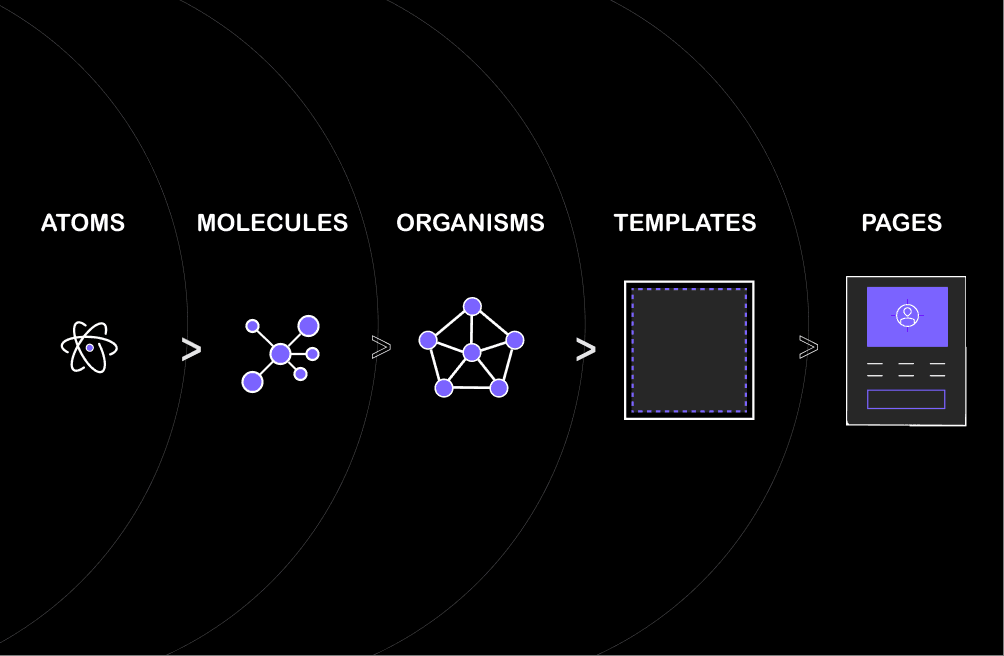
Coined by Brad Frost, this system breaks down the user interface (UI) into smaller, reusable building blocks. It’s like chemistry—but for design. Think about it:
Atoms are the simplest elements.
Molecules are groups of atoms combined.
Organisms are complex groups of molecules.
These building blocks come together to create templates and, eventually, full pages. It’s like magic—but better because it’s science (and design!).
Here are the 5 key stages of atomic design that simplify the process:
Atoms: The Building Blocks
In atomic design, atoms are the smallest units of your system, which are UI elements like buttons, icons, text fields, color palettes, and typography. When by themselves, they seem quite minimal, but when added — like adding color, text, and icons to a button — they become essential elements of a larger, working design. Atoms are small, but they form the ground on which everything in the atomic design system is built.
So, without them, you’d not have those complex, reusable pieces that make your interface come to life.
Molecules: Combining Atoms to Form Functional Components
Molecules are atoms joined together to form functional groups. A search bar is an input field along with a submit button; that is a form field comprising a label, text input, and button. These reusable blocks of code make design easy and consistent.
A login form consists of labels, inputs, and buttons; each of these atoms combines to produce the form’s functionality. By combining atoms, molecules create practical, interactive UI elements ready for use!
Organisms: Combining Molecules for Complex Structures
Organisms bring together multiple molecules to form larger, functional sections of a user interface. For example, a website header is considered an organism where the molecules are combined as the logo, search bar, and navigation menu, creating recognizable and functional sections.
Similarly, a product card on an e-commerce site combines a title molecule, image molecule, and button molecule to showcase a product. These organisms, while not fully operational on their own, form essential, reusable building blocks that help create clear and organized UI sections.
Templates: Page Layouts Using Organisms
Templates are the blueprints of a webpage and only indicate structure without content. These “organisms” — reusable bits of the page, such as headers, footers, or product descriptions — help compose the layout. For instance, for a product page template, the location of the header, product description, and associated products is indicated, forming a wireframe for upcoming content.
Templates assist designers and developers in planning the page flow without getting into detail. Once the template is in place, adding content becomes relatively easy, and the layout remains consistent throughout development.
Pages: Final Design with Real Content
Pages are the atomic design’s final product when filled with actual content like texts, images, and products. It combines all types of atoms, molecules, organisms, and templates in a user-ready design. The product detail page, for example, uses a template filled with product information such as name, images, and price, which provides a complete user experience.
Google: Material Design
Google’s Material Design uses atomic design, starting with atoms like colors and icons, forming molecules like buttons, and building organisms like app bars for cohesive pages across Google platforms.
Airbnb: Design Language System (DLS)
Airbnb’s Design Language System (DLS) ensures a seamless experience across its platforms by applying atomic design principles. Atoms like colors and shadows combine with molecules like buttons to form organisms like headers. These are then arranged into templates, and actual content, like property details, completes the page.
Shopify: Polaris Design System
The Polaris Design System in Shopify uses atoms such as fonts and buttons and molecules such as product cards and then combines these into organisms and templates for pages such as cart or product details, which are filled with real content.
Salesforce: Lightning Design System
In using atomic principles, the Lightning Design System by Salesforce ensures to creation of modular CRM interfaces combining atoms like icons with molecules such as data inputs in organisms and templates to develop workable pages like lead tracking interfaces.
Spotify: Backstage Design System
Atomic design is used in Spotify’s Backstage Design System to simplify the development of internal tools. Atoms such as buttons and colors are combined with molecules like toggle switches to form organisms such as search bars, which are then used in templates for music recommendation pages filled with real user data.
Now that we understand the core principles let’s take a look at how the atomic design system can benefit you as a designer, developer, or project manager:
1. Reusability
The atomic design system is all about reusability. Since atoms and molecules have been designed to be modular and independent, they can easily be reused on several pages or screens. This makes it much faster to design new screens and ensures consistency across your entire product.
2. Scalability
As your design system grows, the atomic design allows the system to scale because you can add new atoms, molecules, and organisms at will without disturbing the whole system.
3. Consistency
Using a shared library of components (atoms, molecules, organisms) helps atomic design preserve consistency in your design among different pages and platforms, which makes the user’s experience much better and your product looks more professional.
4. Efficiency
Atomic design simplifies responsive website creation by reusing components. This saves time and ensures that the adaptation to different devices is easy.
Check out our insights on responsive websites!
5. Collaboration
Atomic design enhances collaboration by using shared building blocks, allowing designers, developers, and content creators to work in sync without getting on each other’s toes.
Focusing on small reusable components and building them into larger structures, atomic design will give you the ability to produce designs that are consistent and flexible to be updated or extended at any point in time if your project grows.
Whether you are a beginning or an experienced designer, working according to the principles of the atomic design system will mean designing smarter and not necessarily harder. Your design workflow gets more structured, collaboration is enhanced and delivers better-quality end results that are user-friendly.
Want to learn how your design decisions affect user behavior? Find out more about this in our article on the Psychology of User Interface.
Share

